What to Do If the App Does Not Work
If the Battery Restrictions and Background Activity settings are not configured properly, this app may not work correctly.
If you have not completed these settings yet, please configure them now.
How to Set Up Battery Restrictions and Background Activity.
After updating Android OS or your device manufacturer’s system, these two settings may be reset.
Even if you have already finished the setup, please check the settings again just in case.
If the App Still Does Not Work After Completing the Settings
Due to background restrictions imposed by the OS, this app may stop working over time.
If this happens, simply open the app once to restore its functions.
When the issue is caused by OS background restrictions, opening the app can reduce those restrictions.
Even if the Battery Restrictions and Background Activity settings are configured correctly, OS background restrictions cannot be completely removed.
For this reason, we recommend opening the app once every few days.
If It Still Does Not Work
Make sure that the Block the rotate button switch in this app is turned on.
If the switch is turned off, the app’s blocking function will also be disabled.
After checking the switches, make sure the following three permissions are allowed:
- Notification
- Display over other apps
- App usage data
If any of these permissions are not allowed, this app will not work properly.
Especially on some devices, the Display over other apps may be split into multiple settings, like in the images below. This is common on devices made by some Chinese manufacturers.
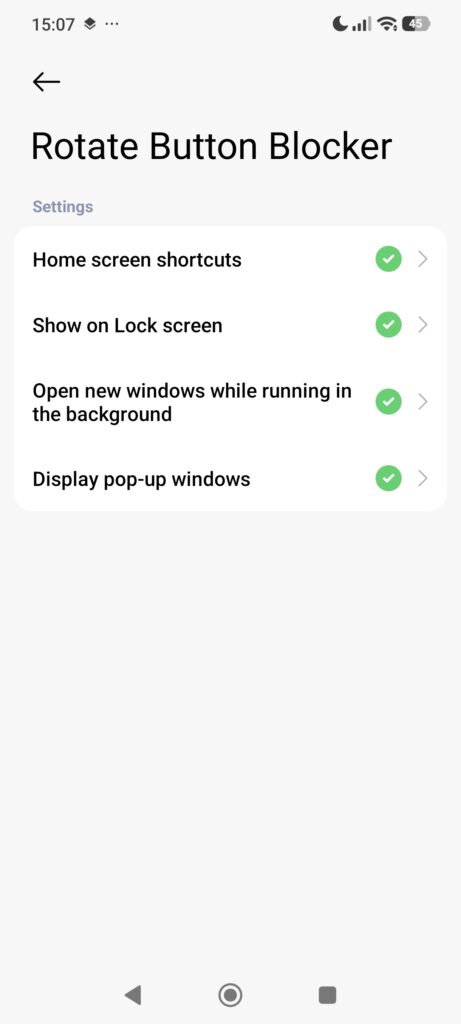
Make sure that all split permissions are also allowed.
- Press and hold the Rotate Button Blocker app icon
- Tap App info or the info icon
- Tap Other permissions or Display over other apps
- Allow all split permissions
After updating Android OS or your device manufacturer’s system, these permissions may be reset.
Even if you have already allowed them before, please check them again just in case.
If It Does Not Work in Some Apps
First, check whether the app is in the Excluded apps list.
If an app is excluded, this app will not work in that app.
If this app does not work in an app that is not excluded, that app may be a type of app where the blocking function cannot work.
- Device settings
- In the AI mode in the Google app
- When the OS or the device manufacturer forces the button to appear regardless of the device state
This app can block the rotation button in many apps, but it may not work in some cases.
The App May Not Work Properly After OS or System Updates
On Android devices, background restrictions often become temporarily stricter after updating the OS or your device manufacturer’s system.
Because of this, this app may not work properly for a while.
While the device is charging, these background restrictions are usually relaxed enough that you may barely notice the issue. But, there is no other solution.
The restrictions usually become weaker after a few hours to about one week, and the app should start working normally again.
Even if the Battery Restrictions and Background Activity settings are configured correctly, these temporary background restrictions cannot be completely prevented.
In this case, the only solution is to wait until the system becomes stable again.
The App May Be Restricted When the Device Is Idle
On some devices, the device manufacturer’s custom system may apply stronger background restrictions during times when the device is usually not being used, such as while sleeping.
As a result, if you use your device during those times, this app may not work properly.
These background restrictions cannot be completely prevented, even if the Battery Restrictions and Background Activity settings are configured correctly.
If you would like this behavior to be improved, please contact your device manufacturer.